Neighbors by Ring
- 4.7
- Rating
- 5.00M
- Installs
- Free
- Price

 Analysis by App-foxy
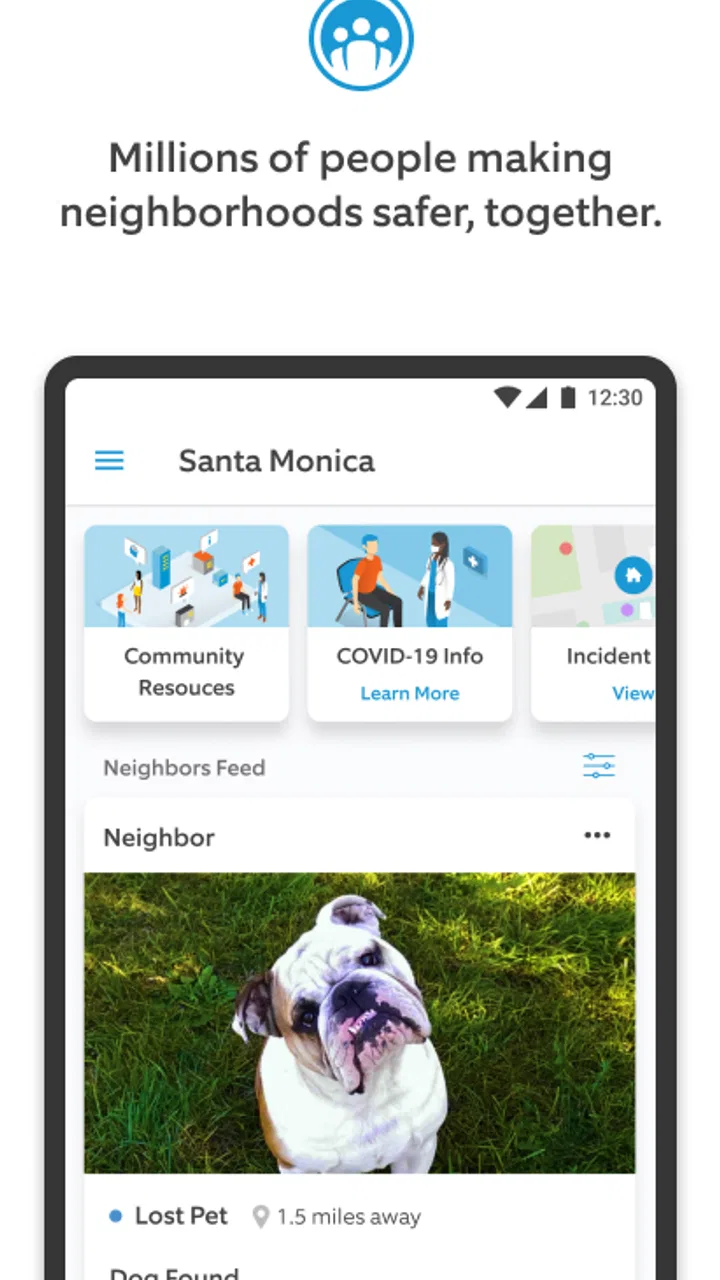
I found Neighbors by Ring most useful when I stopped treating it like a general news feed and started using it as a local awareness tool. The app sits in the News & Magazines category, but its value is much more specific: it brings neighborhood reports and Ring-related community information into one place so I can see what people nearby are discussing. That makes it potentially helpful for spotting patterns, asking for local context, or sharing a concern with people who live close by.
It is a free app from Ring.com, with a Teen content rating, and it has built a substantial audience: the listing shows a 4.7 average from around 78 thousand ratings, more than a million installs, and roughly 17 thousand written reviews. Those figures suggest that the service is familiar to many users, although popularity does not remove the need to judge local activity for yourself. A quiet neighborhood feed can feel very different from a busy one.
Getting past the first points of friction
The first difficulty is often expectation. Neighbors by Ring is not a replacement for a city newspaper, a private neighborhood chat, or a direct emergency service. I see it as a community layer: useful for nearby observations, but dependent on what people choose to post and how carefully those posts are written. If I open it expecting a complete, verified account of everything happening around me, I am likely to be disappointed.
You May Also Like

 Blood Strike: 2.5 Anniversary
Blood Strike’s Loadouts Turn Every Drop Into a Tactical Gamble
A close look at Blood Strike’s custom loadouts: how fast access to signature weapons reshapes its battle royale rhythm, rewards preparation, and narrows the gap between fights.

 Pandora - Music & Podcasts
Pandora’s Music Is Easy to Start, but Harder to Recover
Pandora’s strength is its low-effort path from a seed to a station. Its weak spot is how much confidence it asks you to place in connection, setup, and quiet recovery.

 8 Ball Pool
 Is Built on Rivalries, Rematches, and Routine
A close look at the rivalries, rematches, shared routines, and unanswered safety questions that turn a quick pool match into a persistent mobile community.

 Samsung Music
’s Quiet Strength Is Playing What You Already Own
Its reach comes less from spectacle than from dependable access to a personal library. That simplicity is both the app’s strongest retention engine and its ceiling.

 AccuWeather: Weather Radar
AccuWeather Review: A Quick, Clear Forecast for Everyday Decisions
For everyday plans, the best forecast is the one you can understand quickly. AccuWeather makes rain timing, radar, and local conditions easy to act on, with a few trade-offs.

 Hill Climb Racing
Why Hill Climb Racing Still Turns Crashes Into One More Run
A tiny car, a bumpy hill and one more upgrade: Hill Climb Racing keeps resurfacing because its simple chaos makes every near-miss feel personal.
More From Our News Desk
View All News


The second sticking point is location relevance. A community app only becomes useful when its local area is set up correctly and the feed reflects the place I actually care about. During setup, I would take time to review the location information rather than rushing through the screens. An incorrect or overly broad area can make the feed feel noisy, while an area that is too narrow may leave it looking empty.
I would also make sure the app is running on a supported device before troubleshooting anything complicated. Neighbors by Ring lists Android version 9 as its minimum operating system, and the current version shown is 4.24.3. If the phone is older than that requirement, updating the app repeatedly will not solve the underlying compatibility problem. On a supported phone, installing the latest available version is still a sensible first step because basic bugs are often fixed through app updates.
One practical tip is to begin with a short observation period instead of immediately judging the service. I would open the feed at different times of day, look at whether posts are genuinely local, and notice whether the discussions are useful or mostly repetitive. This matters because the experience is shaped by the activity of the surrounding community, not just by the app interface.
What I check before blaming the app
When a feed does not look right, I start with simple checks. I confirm that the phone has a working internet connection, try switching between Wi-Fi and mobile data, and reopen the app after the connection is stable. A weak connection can make a community feed appear incomplete even when the service itself is working normally.
I also check whether the phone has enough free storage and whether its operating system is current enough for the installed release. I avoid clearing app data as a first move because that can remove local settings or require me to go through setup again. Closing and reopening the app is less disruptive and often enough to clear a temporary loading problem.
Notifications deserve a separate look. If I am not seeing alerts, I check the phone's notification settings as well as the app's own controls. A system-level block can make the app seem silent even though new neighborhood activity is available. Battery-saving settings can also delay background notifications on some phones, so I review those settings before reinstalling anything.
The same principle applies to location-related problems. I check whether the phone permits the app to use the location information it needs for the experience I want, and I verify that the selected neighborhood makes sense. If the feed is showing distant discussions, I do not assume that the content is broken; the location configuration may simply need attention.
Privacy is another setup decision rather than a technical afterthought. I would read each screen carefully before accepting settings, especially when deciding how much personal or location information to share. A community feed is more comfortable to use when I understand what I am making visible and when I avoid posting details that could identify my routine, home, or absence.
A safer way to use local reports
One of the most useful habits I developed is separating observation from conclusion. A post about a vehicle, noise, or unusual activity may be helpful as an early signal, but it is still a neighbor's account. I read the wording, time, and location carefully, and I avoid treating speculation as fact. This keeps the app useful without turning it into a source of unnecessary alarm.
If I decide to post, I keep the report factual and limited. I describe what was seen, where it happened in broad terms, and when it occurred, without adding private information about another person. I avoid naming individuals unless there is a clear, appropriate reason, and I do not publish images or details that could expose someone's home or daily schedule. The strongest community posts are specific enough to help and restrained enough to protect people.
A realistic example is arriving home and noticing that several neighbors are discussing repeated package problems on the same street. I could use the feed to compare timing and see whether the reports appear connected, but I would not use it as proof that a particular person is responsible. If the situation is urgent or dangerous, I would contact the appropriate local emergency or public-safety service instead of waiting for replies in the app.
Another useful workflow is to treat the feed as a starting point for a conversation, not the final record. If I see a report that affects my building or block, I can check whether the details are current, ask a focused question, and then move to a more suitable private channel when personal information is involved. This prevents a public thread from becoming a place where sensitive details accumulate.
Recovering when the normal workflow breaks
When content does not refresh, I use a gradual recovery process. First I confirm the connection, then close and reopen the app, and then check for an available update. I only move to signing out, reinstalling, or resetting settings if the simpler steps fail. That order saves time and reduces the chance of losing settings unnecessarily.
If the app opens but the feed remains empty, I compare that behavior with what I know about the neighborhood. A quiet feed may reflect limited local posting rather than a malfunction. I look for whether other parts of the app respond normally, whether the location is correct, and whether the same issue continues after a fresh connection. This distinction is important because reinstalling cannot create community activity that is not there.
When notifications stop, I test the app directly instead of relying only on alerts. If new material appears when I open it, the issue is probably related to notification delivery or phone settings rather than the underlying feed. I then review notification permissions, battery restrictions, and any system focus or silent modes that might suppress alerts.
For login or account trouble, I avoid creating multiple accounts in a hurry. I check the spelling of the sign-in details, confirm that the connection is stable, and use the app's normal account-recovery route if needed. Repeated failed attempts can make a simple typing mistake look like a larger service problem.
It is also worth remembering that an update can change the way a familiar screen behaves. The current release, 4.24.3, may not look exactly like an older version. I give myself a moment to inspect the available controls instead of assuming that a moved option has disappeared. If a problem began immediately after an update, noting that timing is useful when reporting it through the app's support channels.
When the app is not the real cause
Some frustrations come from the nature of neighborhood information. A report can be delayed, incomplete, duplicated, or written from one person's point of view. That is not necessarily a software failure. The app can organize community posts, but it cannot guarantee that every observation is accurate or that every area will have active contributors.
Local relevance can also vary sharply from one place to another. In a highly active area, the feed may be informative but busy. In a quieter area, it may show little and update slowly. I would not compare those experiences as if they were purely technical results. The community itself is part of the product.
There is a similar distinction with privacy concerns. If I feel uncomfortable sharing a location or reading a public discussion, changing my own usage is more appropriate than expecting the app to behave like a private messaging service. I keep my posts general, avoid real-time information about my movements, and use a private channel for anything involving personal contact details.
The app is also not the right tool for every kind of local information. For broad regional reporting, a reliable news outlet is usually better organized. For direct communication with a small group, a private neighborhood chat can be more efficient. For official notices, I would look to the relevant local authority. Neighbors by Ring is strongest in the space between those options: informal, nearby, and community-driven.
Who will get the most from it
I think the app suits people who want a quick sense of what is being discussed around them and who are willing to evaluate posts critically. It can be especially practical for someone who has recently moved, wants to understand local concerns, or prefers a single place to review nearby community reports. It may also help users who already have an interest in Ring's neighborhood ecosystem and want a dedicated way to follow local conversations.
It is less suitable for someone who wants guaranteed real-time coverage, official confirmation, or a completely quiet experience. People who dislike public community discussions may find the format uncomfortable. I would also skip it as a primary source for emergencies, legal decisions, or accusations about individuals. In those situations, the app's informal nature is a limitation, not a benefit.
Compared with ordinary news applications, the advantage is proximity. National or regional news gives broader context, while this app can surface issues that would never appear in a mainstream feed. Compared with a private chat, the advantage is reach within the local community, but the trade-off is less control over who participates and how carefully information is handled.
The free price makes it easy to try without committing money, but the real cost is attention and judgment. I would not enable every possible alert automatically. I would start with the notifications that matter to me, observe the signal-to-noise level, and adjust from there. That small choice makes the app feel more like a useful local dashboard and less like a stream of interruptions.
My practical verdict after using it
Neighbors by Ring is a focused community-news app rather than an all-purpose news reader. I like it most when I use it to notice local patterns, compare nearby observations, and start sensible conversations while keeping expectations realistic. Its strongest quality is the local angle; its biggest weakness is that local usefulness depends on participation, accuracy, and the care of the people posting.
The service was released on May 7, 2018, and its continued presence, more than a million installs, and strong 4.7 average indicate that it has found a lasting audience. The Teen rating is a reminder that community reports can involve unsettling or mature situations, so I would use discretion when deciding whether it is appropriate for younger members of a household.
I would recommend trying it if you want neighborhood context and are comfortable checking information before acting on it. I would not recommend relying on it as an emergency channel, an official news source, or a substitute for private communication. In my experience, the best results come from a careful setup, restrained notifications, privacy-aware posting, and a willingness to distinguish a useful lead from a confirmed fact.
That balance is what makes the app worthwhile for me. It does not need to replace every other local resource. Used alongside official services, trusted news, and private conversations, it can provide a practical view of what people nearby are noticing. If that is the kind of awareness you want, Neighbors by Ring is a sensible free option to explore, provided you are prepared to manage the setup and interpret the feed with common sense.
Ring.com keeps the product positioned around joining the neighborhood, but I would define its role more narrowly: it is a window into local discussion, not a guarantee of local truth. That distinction is easy to miss and essential to using it well. For me, that honest understanding turns a potentially noisy feed into a useful part of everyday neighborhood awareness.
FAQs for Neighbors by Ring
01What is Neighbors by Ring and how does it work?
Neighbors by Ring is a community safety app that allows users to share and receive real-time crime and safety alerts from their neighbors and local law enforcement. The app connects to Ring devices, such as doorbell cameras, to provide video footage and updates on suspicious activities. It's a tool for enhancing neighborhood security and awareness.
02Is Neighbors by Ring free to use?
Yes, Neighbors by Ring is free to download and use. Users can access neighborhood alerts, share videos, and view posts from their community without any cost. However, additional features or integrations with Ring devices may require separate purchases or subscriptions.
03How does Neighbors by Ring protect user privacy?
Neighbors by Ring is designed with privacy in mind. Users can post anonymously, ensuring personal information is not disclosed. The app only shares content that users voluntarily upload. Additionally, Ring ensures that video footage shared with law enforcement is done with user consent, maintaining privacy and control over personal data.
04Can I use Neighbors by Ring without owning a Ring device?
Yes, you can use Neighbors by Ring without owning a Ring device. The app is open to anyone interested in staying informed about local safety issues. You can view and share posts, receive alerts, and participate in community discussions even if you don't have a Ring camera or doorbell.
05What types of alerts will I receive from Neighbors by Ring?
Neighbors by Ring provides various alerts related to safety and crime in your area. These include reports of suspicious activities, package thefts, break-ins, and other community concerns. Users can customize notification settings to focus on specific types of incidents or areas of interest, ensuring relevant information is always at your fingertips.
Pros
- Easy to navigate user interface.
- Real-time safety alerts and updates.
- Community-driven incident reporting.
- Integration with Ring devices enhances functionality.
- Customizable notification settings.
Cons
- Limited to Ring ecosystem for full features.
- Privacy concerns with location sharing.
- Requires stable internet connection.
- Can lead to over-reporting minor incidents.
- Notifications can become overwhelming.

Neighbors by Ring
Gallery